
Custom Domains for Bio Pages and Short Links
Why the address matters more than the tool, and exactly how to point a domain at your bio page.
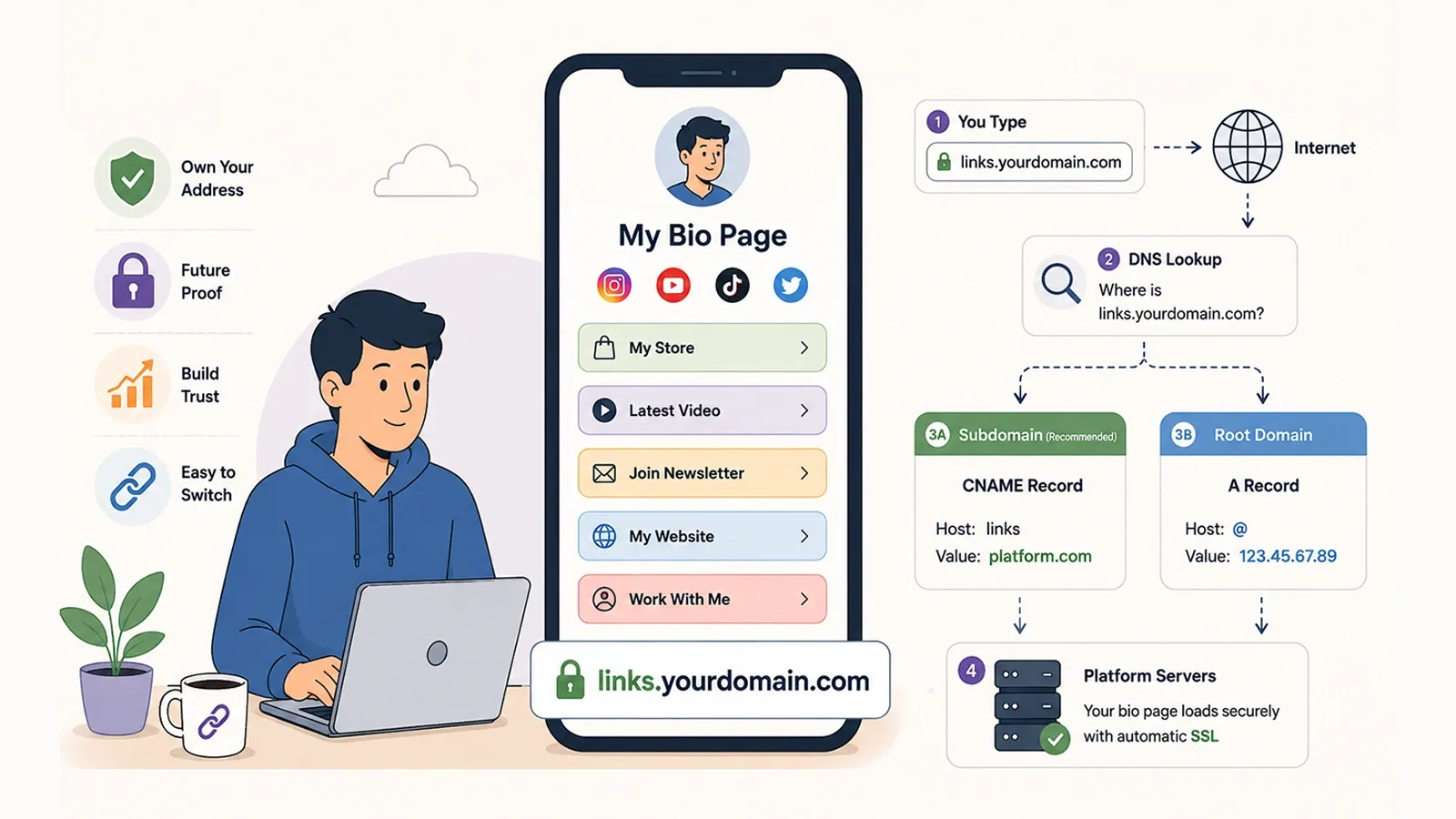
Almost every argument about bio page tools is an argument about features. Themes, blocks, integrations, analytics depth. These are real differences, and they are also the differences that stop mattering the moment you want to leave.
The decision that outlasts every feature comparison is a duller one: who owns the address your audience actually types. This guide explains why that question decides more than it appears to, and then walks through exactly how to point a domain you own at a bio page or a set of short links.
The lock-in nobody notices until it matters
Consider two links that do exactly the same thing today.
| Scenario | sometool.com/yourname |
links.yourdomain.com |
|---|---|---|
| You switch to a different tool | Every published copy of the link is now wrong | Change one DNS record; the link is unchanged |
| The tool raises its price | Leaving costs you the address | Leaving costs you an afternoon |
| The tool shuts down | Every link stops resolving, permanently | Repoint the domain elsewhere |
| The link is printed on packaging | The printed material is now wrong | The printed material still works |
| A visitor sees the link in your bio | They see the tool's brand | They see yours |
Nothing in that table depends on which tool is better. It depends only on which name sits in front of the slash. A custom domain does not make your bio page better; it makes your bio page portable, which is a different and more durable kind of value.
Subdomain or root domain?
This is the first real decision, and most people should make the same choice.
A subdomain — links.yourdomain.com, go.yourdomain.com, bio.yourdomain.com — leaves your main website exactly where it is. It uses the simplest DNS record, it is trivially reversible, and it reads clearly to anyone who sees it. This is the right answer for nearly everyone.
A root domain — yourdomain.com pointing directly at the bio page — means the bio page becomes your homepage. That is occasionally exactly what a creator wants, and much more often a mistake made by accident. It is also technically fussier, for reasons the next section explains.
On naming: links and go are the conventional choices, and convention is worth something here. A visitor who sees go.yourdomain.com/summer understands it instantly. Clever subdomains age badly.
CNAME and A records, explained properly
DNS is a directory. When a browser is asked for links.yourdomain.com, it asks the directory where to go, and the record you create is the answer.
CNAME: point at a name
A CNAME record says "this subdomain is an alias for that hostname." Your subdomain points at the platform's hostname, and the platform is then free to change its own servers and IP addresses without your link ever noticing. This indirection is the entire point, and it is why a CNAME is the correct record for a subdomain.
links · Value: the hostname your platform gives you
A record: point at an address
An A record points at a fixed IP address instead of a hostname. It exists because of a genuine constraint in the DNS specification: a root domain cannot use a CNAME. A CNAME cannot coexist with the other records a root domain is required to have — most importantly its MX records, which route your email. Configure a CNAME on a root domain and, depending on the provider, you will either be refused or you will break your email.
So root domains use an A record pointing at the server's IP. The trade-off is that the indirection is gone: if the platform ever changes that IP, your link breaks until you update the record. Some DNS providers solve this with CNAME flattening or ALIAS records, which behave like a CNAME at the root and resolve the indirection on the provider's side. If your DNS host offers this, it is the better option.
SSL, and the warning your visitors must never see
A domain that resolves but has no certificate produces a browser security warning, and a security warning on a link in your bio is worse than having no link at all. Trust is not recoverable at that speed.
Modern platforms issue certificates automatically once the domain verifies, and renew them without intervention. The sequence matters: the domain must resolve to the platform before a certificate can be issued, because the certificate authority validates ownership by checking exactly that. This is why the order is always add the record, wait for it to resolve, let verification pass, and only then publish the link. Publishing during the gap is what produces the warning.
If a certificate has not appeared long after the DNS is correct, the usual cause is a proxy in front of the record — a CDN set to "proxied" rather than "DNS only" can prevent the validation check from reaching the platform.
Setting it up on Linkly
The steps are the same in principle everywhere; these are the specifics here.
- Add your domain in Dashboard → Custom Domains. Enter the subdomain you intend to use, for example
links.yourdomain.com. - At your registrar or DNS host, create a CNAME record. The host is your chosen subdomain; the value is shown on that page. If you are using a root domain instead, the same page shows the A record IP to use.
- Return and click Verify. Real DNS lookups run against your domain — CNAME, A and AAAA records are all checked, and CDN chains are followed — so verification reflects what the world actually sees rather than what you intended.
- Once verified, assign the domain to a bio page. The page is then served at the root of that domain, and any short links you create resolve underneath it.
SSL is provisioned automatically after verification. If it has not completed within a few minutes, check that any CDN proxying is disabled for that record while validation runs.
What a custom domain does not do
Three honest limits, because the feature is oversold.
It does not improve your SEO. A bio page on your own subdomain is not meaningfully more visible to search engines than one on a platform domain. Bio pages are not built to rank, and both versions carry the same thin content. If search visibility is your goal, the answer is real content on your main site, not a subdomain.
It does not make links unbreakable. It moves the point of failure from the platform to you. If the domain registration lapses, every link dies just as surely — and rather more embarrassingly, since the domain can then be bought by someone else.
It does not migrate your analytics. Click history belongs to whichever platform recorded it. A custom domain means your links survive a move; the data behind them still does not.
What it does do is remove a dependency that gets more expensive to remove with every passing month. If you intend to publish a bio link at all, publishing it on an address you control is the cheapest decision you will ever make about it.
Related reading: how short links and redirects work, and what actually belongs on a bio page.
Frequently asked questions
Do I need a custom domain for a bio page?
You do not need one to publish a page. You need one if you want the address to keep working when you change tools, because a link on someone else's domain stops working the moment you leave. If your bio link is printed anywhere, or embedded in content you cannot edit, the custom domain is what protects it.
Should I use a subdomain or my root domain?
A subdomain such as links.yourdomain.com is almost always the right choice. It uses a straightforward CNAME record, it leaves your main website untouched, and it reads clearly. Pointing a root domain at a bio page means your homepage becomes the bio page, which is rarely what people intend.
What is the difference between a CNAME and an A record?
A CNAME points your subdomain at another hostname, letting the destination change its own IP address without breaking your link. An A record points directly at a fixed IP address. Subdomains should use a CNAME; root domains often cannot, which is why they fall back to an A record.
Why can't I use a CNAME on my root domain?
The DNS specification does not allow a CNAME to coexist with the other records a root domain must have, such as its MX records for email. Some DNS providers work around this with a feature called CNAME flattening or ALIAS records. If yours does not, an A record pointing at the server IP is the alternative.
How long does DNS propagation take?
Usually minutes, occasionally up to a day. The delay comes from the TTL on your existing records, which tells resolvers how long to cache the old answer. Lowering the TTL a day before you make a change shortens the wait considerably.
Is SSL automatic on a custom domain?
On most modern platforms, yes. Once the domain resolves correctly, a certificate is issued automatically and renews on its own. Until the certificate is issued, visitors may briefly see a security warning, which is why verification should complete before you publish the link anywhere.
Start with a free Linkly account
Create short links, a bio page and QR codes from one account. Check current limits and premium features before choosing a plan. No credit card required to start free.
Get Started Free